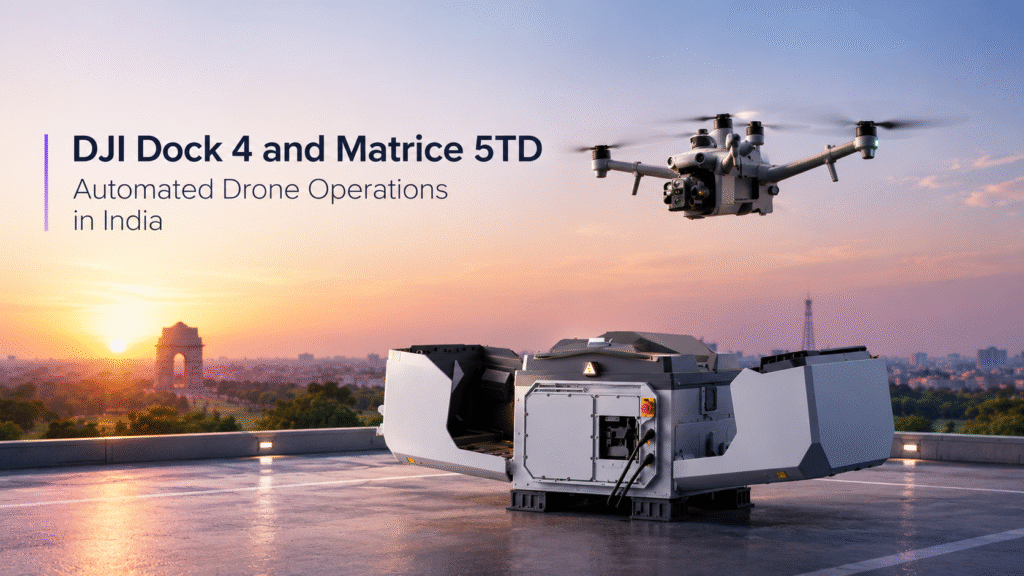
DJI Dock 4 and Matrice 5TD: Automated Drone Operations in India
Many inspection and monitoring teams hit the same limit: every flight needs a pilot on site, a battery change and a manual launch. The DJI Dock 4 and Matrice 5TD are designed to reduce that load, pairing an enterprise drone with an automated docking station for remote deployment and recurring missions.
DJI launched the two together in October 2026. This guide covers what each does, how they work together, where the combination fits in India and what to plan before enquiring.
What Is the DJI Dock 4?
The DJI Dock 4 is an automated docking system for the Matrice 5TD. It houses the drone between flights and supports remote deployment, so a mission can be launched without someone standing beside the aircraft.
It is built for recurring work, such as scheduled site checks, repeat inspections and rapid response to alerts. DJI states the dock can complete a battery swap in about 25 seconds, which helps the drone get back in the air quickly.
What Is the DJI Matrice 5TD?
The DJI Matrice 5TD is an enterprise drone for professional inspection and monitoring. Its payload combines thermal imaging, telephoto imaging, laser ranging and full-colour night vision, backed by LiDAR, millimetre-wave radar and vision-based obstacle sensing.
Key manufacturer-stated figures include:
- Thermal resolution: 1280 × 1024 native, with an Ultra High Resolution mode of up to 2560 × 2048
- Telephoto: 11×
- Flight time: up to 59 minutes under controlled test conditions
- Laser ranging: up to 3,000 metres under specified conditions
These figures depend on test conditions and are not guaranteed on every flight. For a fuller breakdown, see our guide to the DJI Matrice 5TD in India.
How the DJI Dock 4 and Matrice 5TD Work Together
On its own, the Matrice 5TD needs a pilot and a field setup for every launch. With the Dock 4, the drone sits at the site, ready for the next task.
In practice, the workflow looks like this:
- The drone is housed in the dock at or near the site.
- A mission is scheduled or dispatched remotely.
- The drone flies, captures thermal and visual data and returns.
- The dock swaps the battery so the next mission can follow.
This only works with the right setup: suitable connectivity, a defined mission plan and compliance with applicable rules. Remote operations still need proper oversight.
Where the Combination Makes Sense
Docked operations suit organisations that fly the same routes repeatedly or need quick aerial views of remote sites.
Power line and substation monitoring. Regular thermal and visual checks can be scheduled without sending a crew each time. Thermal findings still need review by qualified engineers.
Security and perimeter monitoring. After-hours checks, alert verification and low-light views are possible with night vision, within an appropriate operating framework.
What to Plan Before You Buy
An automated setup involves more than the drone. Before requesting a quotation, consider:
- Site suitability: Where the dock will sit, plus power and connectivity needs.
- Mission design: Routes, schedules and what the drone should capture.
- Data handling: Who reviews the imagery and how it feeds into your maintenance or security workflows.
- Training and support: Operator training, maintenance and spare parts.
- Regulations: Indian import, registration, airspace and operating requirements, especially for remote or beyond-line-of-sight style operations.
Pricing depends on availability, configuration and accessories, so a written quotation is the reliable guide.
Is a Docked Setup Right for You?
If you fly occasional, one-off inspections, a manually operated drone may be enough. A dock makes more sense when missions are frequent, sites are remote or response time matters.
Compare your actual workload, expected benefits and total ownership cost before deciding. A smaller or lower-cost platform may serve simpler needs well.
Enquire About the DJI Dock 4 and Matrice 5TD in India
Ready to enquire about the DJI Dock 4 and Matrice 5TD? Contact Dronevex for configuration guidance, pricing and availability at contact@dronevex.in or call +91 9429694828 / 9071136060. Our team will help you understand your requirements and find the right setup for your application.
Frequently Asked Questions
What is the DJI Dock 4?
It is an automated docking system for the Matrice 5TD, supporting remote deployment and recurring missions.
Is the DJI Matrice 5TD compatible with DJI Dock 4?
Yes. DJI introduced them together so the drone can be used in docked, automated workflows.
How fast does the DJI Dock 4 swap batteries?
DJI states an automated battery swap takes about 25 seconds. Check DJI’s official specifications for conditions.
Do I need the DJI Dock 4 to use the Matrice 5TD?
No. The Matrice 5TD can be flown without a dock. The dock adds remote deployment and automated workflows, so it suits frequent or remote missions.
What is the price of the DJI Dock 4 and Matrice 5TD in India?
Pricing varies with configuration, accessories and availability. Contact Dronevex for a quotation.